

2026 REGISTRATION NOW OPEN!
EARLY BIRD – SAVE $25!
ENDS MIDNIGHT 27TH JANUARY.
Registrations open 6th January 2026.
You must be registered by the 27th January 2026 if you are attending grading.
All registrations are online at www.playfootball.com.au
Play Football How to Register Video
How much does it cost to register?
- MiniRoos (U6-U11) = $275 – $285
- Youth (U12-U16) = $315 – $335
- U18 & Seniors = $375 – $520
We have an early bird discount of $25 for registrations made by 27th January 2026.
Active Kids vouchers are also accepted.
Grading is NOT required for the following age groups – Mixed / Men’s U6 & U7 and Women’s U7 & U8
Grading is OPTIONAL for the following age groups – Mixed / Men’s U8 – U10 and Women’s U9 & U10
More information regarding our Grading Policy can be found here
When is grading?
Sunday February 1: U11 – U18 Men’s/Mixed & Women’s
Sunday February 8: U8 – U10 Men’s/Mixed & Women’s
(We will likely run one extra grading session following these dates, date tbc).
When does the season start/ end?
-
- Saturday 11th April 2025 – Mixed and Senior Men’s
- Sunday 12th April 2025 – Girls and Senior Women’s
The competition runs until mid/late August
Mixed Under 6 matches are “zoned”. Teams in this age group only play their games against Avalon FC, Narrabeen FC and other teams at Pittwater RSL FC. (Careel Bay, Boondah Reserve, Kitchener Park).
All other age groups are drawn against teams from any of the 17 clubs on the Northern Beaches that play under the MWFA (Manly Warringah Football Association)
Everyone registers as an individual member of Pittwater RSL FC, the Pittwater RSL FC Age Coordinators (and grading committee for those grading) will then form teams from the registrations in each age group and based on the min. and max. number of players in a team.
Once the teams are formed the age coordinator will put you all in contact via email and ask for the team to nominate a coach and a manager, both of these volunteers will require a valid WWCC.
Training can be on any night (Mon-Fri) that is the most convenient for all the team members and the coach at either Kitchener Park or Jackson Road (Warriewood sports fields).
Once the teams are formed the age coordinator will put you all in contact via email and ask for the team to nominate a coach and a manager, both of these volunteers will require a valid WWCC.
Where else do I find information?
Follow us on our socials: Instagram and Facebook.
Our website Pittwater RSL FC – Play Football on the Northern Beaches
All players will be allocated new jerseys. Shorts and socks can be purchased from the club 💚
RETURNING PLAYERS
- Please ensure you use your existing play football account to register – DO NOT CREATE A NEW ONE
- Please take time to make sure you select the correct age group and if you are mixed (U8, U9 etc) or women’s (W8, W9 etc)
| Year of birth | True age group for 2025 |
| 2021 or 2020 | U6 |
| 2019 | U7 or W7 |
| 2018 | U8 or W8 |
| 2017 | U9 or W9 |
| 2016 | U10 or W10 |
| 2015 | U11 or W11 |
| 2014 | U12 or W12 |
| 2013 | U13 or W13 |
| 2012 | U14 or W14 |
| 2011 | U15 or W15 |
| 2010 | U16 or W16 |
| 2009 or 2008 | U18 or W18 |
NEW PLAYERS
- Please take time to make sure you select the correct age group and if you are mixed (U8, U9 etc) or women’s (W8, W9 etc)
- You can chose to play up an age group by 1 year, but playing down an age group is not allowed.
- ALL AGE GROUPS – please upload a passport style photo (no hats/sunglasses /spectacles) taken in the last 12 months.
- If your child is new to the club and registering in U/12’s or older, you MUST email a copy of your child’s Birth Certificate to the club registrar
- If you are new to the club, registering in U12’s or older and did NOT play for an MWFA affiliated club in the previous season You must also complete a ‘MWFA Registration Form’. (Click here to download the PDF form) Once completed this can be scanned in & emailed to the registrar. If this is not done your child’s registration CANNOT be processed.
- If you or your child last registered club was overseas, an International Transfer Certificate (ITC) must be requested. An ITC is not required for a player under the age of 10 years. (Though documentation is required detailing your move to Australia). ITC’s are only permitted if the player is aged 18 or over. An exception applies if the Player’s parents move to the country in which the new club is located for reasons not linked to football. Players/parents should contact the club registrar where an amateur ITC is required.
- Once you have successfully registered, you will be sent a confirmation email (if this is not received, you have not registered)
COACHES & MANAGERS
Football NSW have made it compulsory for EVERY Coach/Manager/Volunteer to have a valid volunteer Working With Children Check
Please ensure you have a valid WWC# prior to registering online as you will need this information to complete your registration.
The volunteer WWC# is free & can be obtained by visiting New Application – NSW Working with Children Check Please be aware this can take a few weeks to process so please action immediately to avoid missing registration cut off dates
Please ensure that you have uploaded a passport style photo (no hats/sunglasses).
STEP BY STEP GUIDE TO REGISTERING
REGISTERING AS A RETURNING PLAYER
1. Go to the PlayFootball website: www.playfootball.com.au/
2. Select ‘Re-registering to play this season’
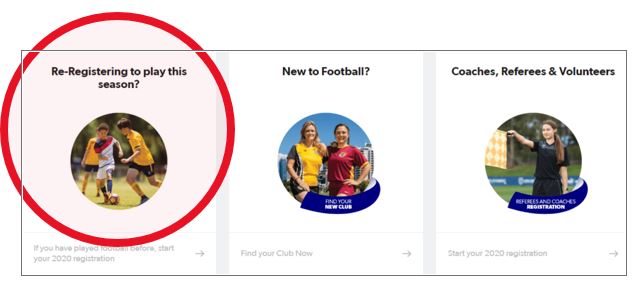
3. Type in Pittwater & select Pittwater RSL Football club
4. Click on ‘Get Started’
5. Please follow these instructions carefully. If you or your child played anywhere in Australia in 2022 you WILL have a football account. Please do not create a new one
6. You will be prompted to retrieve your football account, by entering your email address. Once retrieved this will show everyone linked to you account
7. You can now select the type of football package you or your child will be registering under. Read them carefully. (Please do not select mixed if your daughter wants to play in the female/Sunday comp only.
8. Continue past the fee summary page & complete the participant details. It is important to complete these two questions.
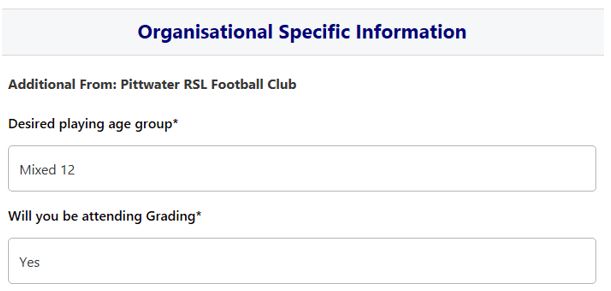
9. You must upload a NEW photo this year. You cannot get past this point unless you do.
10. Answer the International Transfer question. Please note if you answer No to this – you will require an International Transfer
11. Please read the T & C’s carefully as this outlines Pittwater’s Code of Conduct & Grading Policy
12. You will now be at the Payment Screen, you can enter your Active Kids Voucher here – Application Link. Once you have entered your C/C details you will receive a receipt number, you can now ‘Finish Registration’ or ‘Perform Another Registration’
13. You will receive an email stating that your registration is pending approval by the club.
REGISTERING AS A NEW PLAYER
1. Go to the PlayFootball website: www.playfootball.com.au/
2. Choose ‘New to Football’
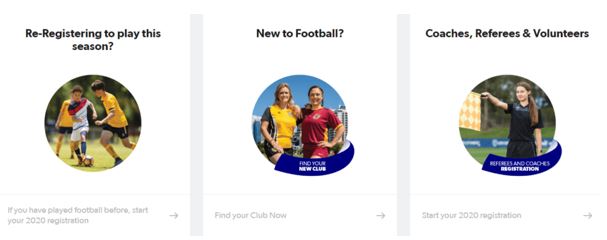
3. Select the appropriate age range – Please note we do not currently run a Miniroos kick off program

4. Type in Mona Vale then click on the map and select “Find out more” on Pittwater RSL Football Club
5. Click on ‘Register Now” top right
6. Click on ‘Get started’
7. Create a ‘Football Account’. Fill in YOUR details. This enables you to link everyone in your family such as multiple children. Link as necessary & continue. You can continue to register an existing family member or create a new player registration
8. You can now select the type of football package you or your child will be registering under. Read them carefully.(Please do not select mixed if your daughter wants to play in the female/Sunday comp only. SELECT THE CORRECT AGE GROUP
9. Continue past the fee summary page & complete the participant details. It is important to complete these two questions
10. You must upload a NEW photo this year. You cannot get past this point unless you do.
11. Answer the International Transfer question. Please note if you answer No to this – you will require an International Transfer
12. Please read the T & C’s carefully as this outlines Pittwater’s Code of Conduct & Grading Policy
13. You will now be at the Payment Screen, you can enter your Active Kids Voucher– Application Link. Once you have entered your C/C details you will receive a receipt number, you can now ‘Finish Registration’ or ‘Perform Another Registration’
14. You will receive an email stating that your registration is pending approval by the club
REGISTER AS A COACH/MANAGER
1. Go to the PlayFootball website: www.playfootball.com.au/
2. Select ‘Coaches, Referees & Volunteers’ (This includes Managers)
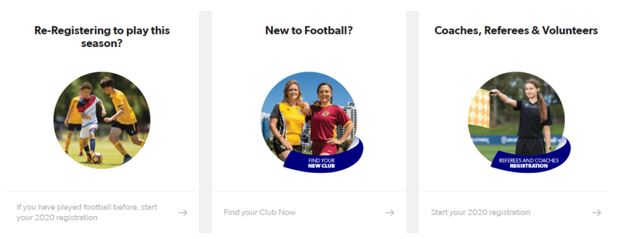
3. Type in Pittwater & select Pittwater RSL Football club
4. Click on ‘Get started’
5. You may have created a ‘Football Account’ already (for your child), if so select the person you are registering as a coach/manager. Or create a ‘Football Account’
6. Select Pittwater RSL FC Coach/ Pittwater RSL FC Manager
7. Select ‘Sub Role’
8. Enter Participants details
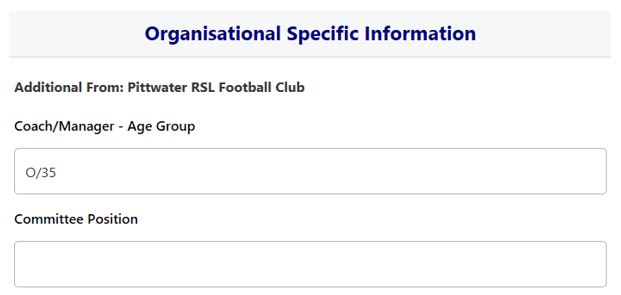
9. Complete the Additional Questions. These are text boxes, so as much information as possible.
10. You must upload a NEW photo this year. You cannot get past this point unless you do.
Where do I go if I need help with my registration?
If you have any trouble with your registration you can use the below resources to help you.
PlayFootball: